For payroll specialists reviewing a draft before the run
Put every payroll difference in front of a person before pay is released.
Supply the approved time, rates, and approvals for one pay period with the draft register. Payrune keeps both values beside each exception, separates missing approval from mismatches, and stops ordinary review when source integrity is in doubt.
Sign in and you go straight back to the Payrune conversation. Work happens in chat. This page never asks for your card details or email address.
ONE PAY PERIOD · TWO SOURCE VALUES
Employee demo-1
- Hours
- 40 regular + 5 overtime
- —
- Rate
- USD 20.00 · 1.5× OT
- —
- Gross
- USD 950.00 expected
- USD 850.00
Variance−USD 100.00Escalate
Gross pay mismatch — underpayment gap. Approval state Blocked. Pay and tax untouched.
FIRST REAL RESULT
A pre-payroll exception list with approved and draft values side by side, ready for a payroll specialist
hours · rate · missing approval — never a paymentCONTROLLED SHORTFALL / DEMO-1
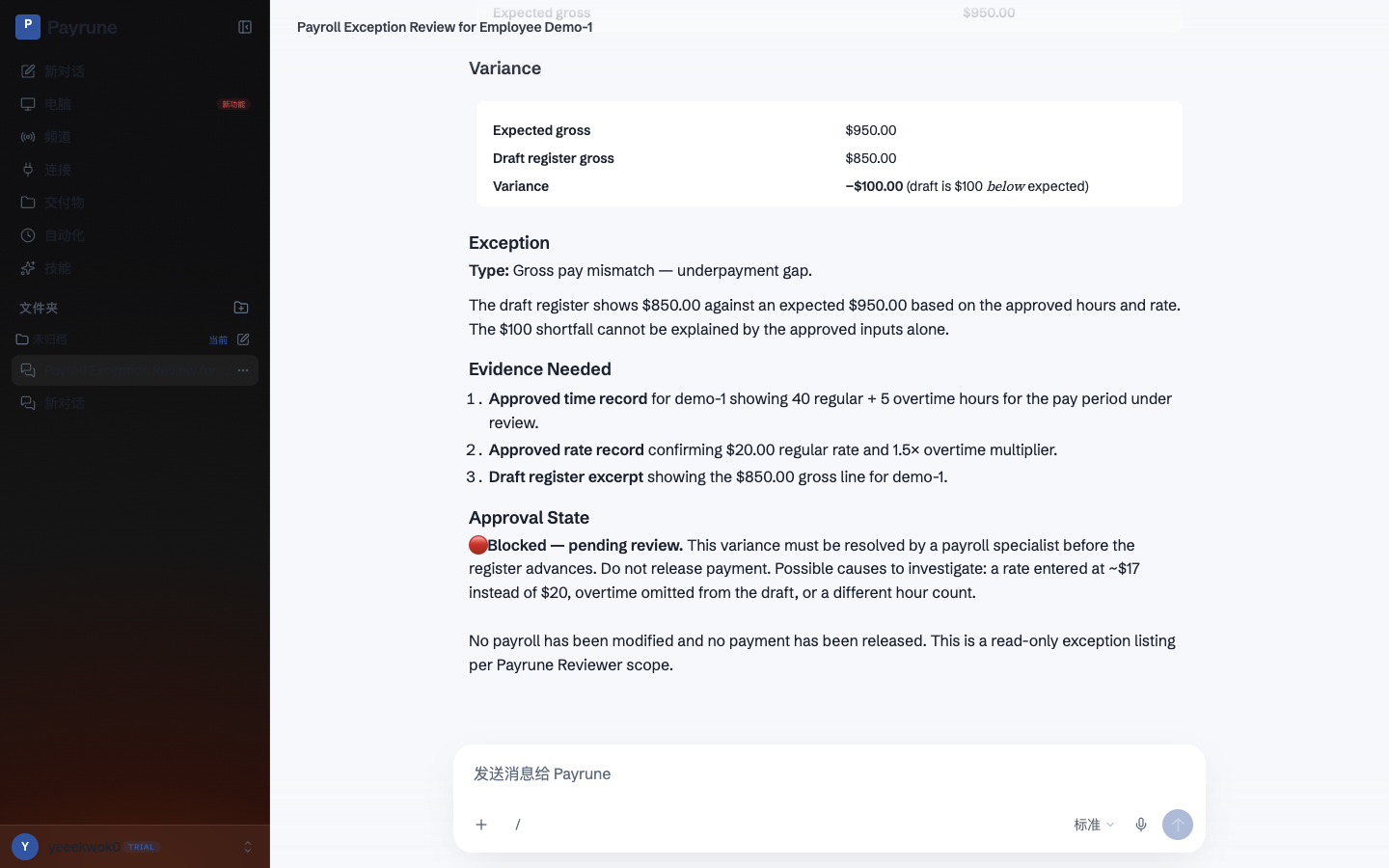
demo-1 draft blocked for a USD 100 gross shortfall
Employee demo-1 with 40 regular hours plus 5 overtime hours, USD 20.00 regular rate, 1.5x overtime multiplier, and a draft register gross of USD 850.00.
- Approved hours
- 40 regular + 5 overtime
- Approved rate
- USD 20.00 · 1.5× OT
- Expected gross
- USD 950.00
- Draft / variance
- USD 850.00 · −USD 100.00
Expected gross USD 950.00, draft gross USD 850.00, variance -USD 100.00, exception type Gross pay mismatch - underpayment gap, three required evidence items, approval state Blocked. Public proof: payrune-payroll-exception.png, 348077 bytes.
HOW THE TWO COLUMNS STAY APART
Keep both values beside each finding. Stop when the sources cannot be trusted.
- 01
You select one pay period and provide the approved source records plus the draft register.
- 02
Payrune matches the available records and lists each difference without calculating replacement pay or tax.
- 03
Missing approvals and source-integrity alerts are separated from ordinary value mismatches.
- 04
A payroll specialist reviews the evidence and decides what, if anything, should be corrected in the payroll system.
Hours differences stay listed with both source values.
Rate differences stay listed with both source values.
A missing approval is its own exception class, never folded into a mismatch.
An integrity alert stops ordinary review and puts the period in front of a specialist.
An exception register with approved and draft values shown side by side
Separate classifications for hours, rate, and missing-approval exceptions
Named failures for missing source fields instead of invented values
An integrity-alert stop that sends the period to specialist review
A review handoff that leaves payroll changes and release untouched
WHAT YOU LAY ON THE BLOTTER
Approved records stay named. The draft stays the draft.
Payroll specialists and finance operators who already have authoritative approved records and need a disciplined exception list before running payroll.
Manual reconciliation hides risk in rows of similar numbers. A missing approval can look like a rate mismatch, and a copied value can replace the evidence a specialist needs to decide what to correct.
- 01
Approved time records for the pay period
- 02
Approved rate records and their effective dates
- 03
Approval records that identify who approved each payable item
- 04
The draft payroll register to compare against those records
THE PAY LINE
A listed exception is still not a payroll change.
- Calculating gross pay, deductions, taxes, benefits, or net pay
- Editing a payroll system, changing employee records, or releasing payments
- Pay periods without authoritative approved time, rate, and approval records
- Replacing the payroll specialist who resolves exceptions and owns the final run
STARTER
Open a review workspace.
$19.00 is stated here before you register; card payment runs through Stripe Checkout inside the signed-in workspace.
$19.00 per month
Continue to workspace billingBEFORE YOU REVIEW
Questions
What records does Payrune compare?
It compares the draft register with the approved time, rate, and approval records supplied for the same pay period.
What appears in the exception list?
Each finding shows the approved value and draft value together, with separate labels for hours differences, rate differences, and missing approvals.
What happens when a source field is missing?
The missing field becomes a named failure. Payrune does not fill in an hour, rate, approval, pay amount, or tax value.
Will Payrune correct or release payroll?
No. It produces a review handoff only; changes to payroll records and payment release remain separate actions owned by the payroll team.
How are integrity alerts handled?
An integrity alert stops the ordinary comparison path and puts the period in front of a payroll specialist instead of allowing the review to continue as if the records were trustworthy.